Station Master Tycoon Codes
Working promo codes, rewards, and how to redeem them before they expire.
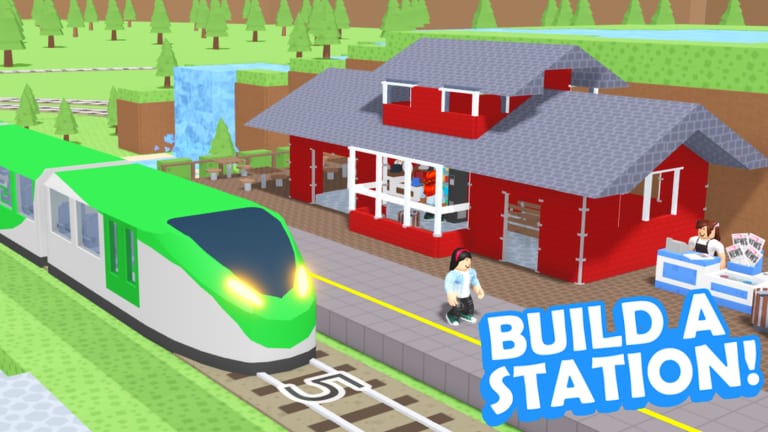
Promo codes are one of the fastest ways to grab free rewards in Station Master Tycoon on Roblox, but only when Taco Dev (Naco88) actually publishes them. The game has supported a redemption system since launch on 19 February 2024, and the experience is free forever, so any future code is pure bonus on top of what you already earn from happy guests boarding trains.
This hub is the single place to check whether new codes exist, what they grant, and how to claim them without wasting time on expired strings copied from old videos. Because the developer does not always announce codes on the same channel, we track the live list on a dedicated page and explain the exact menu path so you never hunt through random UI tabs.
What codes can give you
Historically, Roblox tycoon and sandbox games use codes for starter cash, cosmetic items, limited furniture, or temporary boosts. Station Master Tycoon is a station-building sandbox where you place benches, ticket machines, bathrooms, bakeries, shops, platforms, and tracks while AI guests sit, shop, eat, and eventually ride trains to other players’ stations. Rewards that speed up early building or unlock shop tiers would matter most, but there are currently no active public promo codes — last checked August 2026. When Taco Dev releases one, we list it on Active Codes with the reward spelled out and an expiry note if the developer provides one.
Even with no live codes, bookmark this section. Codes often drop around updates, milestones, or holidays and expire within days. Checking once after a patch takes seconds and can save hours of grinding guest revenue.
How redemption works in-game
You do not redeem codes on the Roblox website or in chat. The flow is entirely inside the experience:
- Load Station Master Tycoon (place ID 16436846604).
- Tap the settings icon at the bottom of the screen.
- Open the Codes tab.
- Type the code exactly as published — codes are usually case-sensitive.
- Press Submit Code and confirm the reward popup.
If nothing happens, the code is likely expired, mistyped, or not yet active on your server region. Our How to Redeem Codes guide walks through troubleshooting, mobile vs PC differences, and what to do when the Codes button is missing after an update.
Keeping your list honest
We do not invent codes or scrape random Discord messages without verification. The Active Codes page states clearly when the list is empty — as of August 2026 — and explains how we add entries. Expired codes are removed so you are not clicking through dead strings from outdated YouTube titles.
When a code goes live, update your routine: redeem immediately, then spend rewards on high-impact station pieces. Early tutorial flow teaches bench → ticket machine → bathroom → bakery → walls → paving → prefab stairs → platform and track; a cash injection right after that sequence helps you unlock shops with stars faster instead of stalling on guest patience.
Codes vs normal progression
Codes are optional. Your main income still comes from happy guests leaving on trains after you meet their needs. Press E (or tap prompts on mobile) to read guest thoughts, fix missing amenities, and keep star ratings climbing. Think of promo codes as a shortcut, not a replacement for learning Guest Needs and Stars or finishing the Getting Started tutorial in order.
Related pages on this wiki
- Active Codes — current working list; last checked August 2026, zero active public codes
- How to Redeem Codes — menu path, typos, and error messages
- Recent Patches — check after Roblox updates before expecting new codes
- Getting Started — first-hour station build after you spawn in
- Guides Hub — tools, platforms, visiting other stations, and rebuild tips
Check back after game updates. When Taco Dev posts a new code, we add it here the same day when possible.
Frequently Asked Questions
Quick answers for Station Master Tycoon players.
Are there any working Station Master Tycoon codes right now?
No. **Last checked August 2026:** there are no active public promo codes. Watch the Active Codes page for the moment Taco Dev publishes a new one.
Where do I enter codes in Station Master Tycoon?
Open the settings icon at the bottom of the screen, choose Codes, type the code, and tap Submit Code. See How to Redeem Codes for screenshots-level detail.
Do codes expire?
Most Roblox game codes expire without warning. Redeem immediately when we list a new code and remove it from your bookmarks once it stops working.
Can I use codes on mobile?
Yes. The same settings menu and Codes tab work on phone and tablet. Use careful capitalization when typing on a small keyboard.
Will codes give free Robux?
No legitimate in-game code grants Robux. Expect in-experience rewards such as cash or items only, and never share your account password for fake code sites.