Station Master Tycoon Guest Needs Checklist
Tick through seating, services, and star goals so AI guests board trains satisfied.
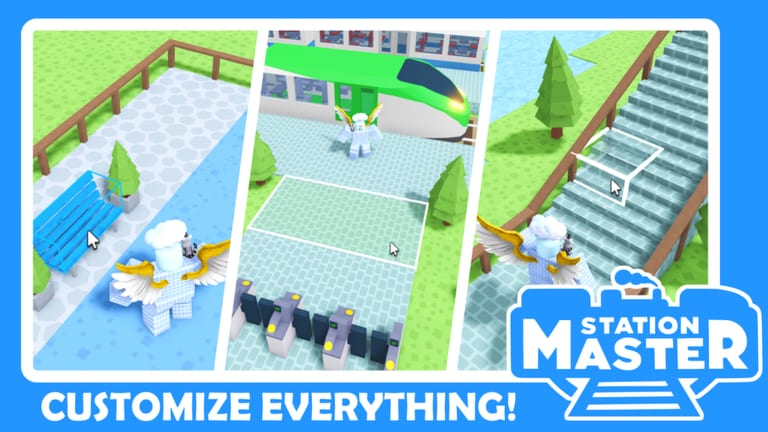
Use this interactive checklist while you play Station Master Tycoon on Roblox. Copy it into notes or keep this tab open — each box represents a guest need or milestone Taco Dev’s tutorial and live servers expect before visitors happily ride trains to other stations.
Press E on PC (or follow on-screen prompts on mobile) to read guest thoughts. If stars stall, walk this list top to bottom before searching for exploits — our Scripts Hub confirms no verified public scripts exist, and missing amenities are the usual culprit.
Before you expand — core tutorial chain
Complete these once per fresh station save:
- Spawn area clear — guests can walk from entry without clipping props or half-built walls.
- First bench placed — seating in the build menu; guests need somewhere to rest early.
- Ticket machine live — place and confirm guests interact before rushing to cosmetics.
- Bathroom available — hygiene need; skipping it triggers negative thoughts fast.
- Bakery or food service — hunger satisfied before long waits on platforms.
- Walls define zones — separate concourse, retail, and platform areas logically.
- Paving / flooring — continuous walkable paths without random gaps.
- Stairs or vertical access — prefab stairs if your layout changes elevation.
- Platform segment placed — aligned with where trains stop.
- Track connected — trains can arrive and depart; test one full loop.
If any box stays unchecked, fix it before grinding stars on decoration. Pretty plants do not replace ticketing.
Every session — guest feedback loop
Run this loop after each building session:
- Listen to three random guests — press E near different NPCs; note repeated complaints.
- Queue paths short — no maze between entrance, shops, and platforms.
- Seating near waits — benches by ticket lines and departure boards.
- Bins placed — litter feedback appears when trash cans are missing on busy concourses.
- Departure board visible — guests find train info without backtracking.
- Shops unlocked with stars — check build menu tiers; higher star items need prior satisfaction.
- Lighting readable — dim corners hide missing amenities; add lamps if thoughts stay vague.
- One test boarding — watch a guest path from spawn → services → platform → train door.
Stuck thoughts often mean one missing category (food, seat, toilet, ticket) rather than “need more scripts.”
Star progression checklist
Stars gate better props. Verify these habits:
- Stars trending up — compare rating before/after a build wave; flat lines mean a blocked need.
- Shop tier reviewed — open build catalog; note star locks on items you want next.
- Retail not blocking paths — shops should invite guests, not trap them in corners.
- Bathroom count scales — add another restroom before doubling platform length.
- Food variety if available — bakery plus cafe zones reduce duplicate hunger complaints.
- Platform capacity matches seating — long trains need longer benches and wider concourses.
- Eyedropper duplicates smart props — copy ticket machines or bins instead of misplacing new ones.
- Paint last — recolor floors after layout works; see Layout Planner.
For narrative context on each step, read Getting Started — this checklist is the at-a-glance version.
Multiplayer server checklist (up to 4 players)
Official descriptions allow small servers. Coordinate so guests do not confuse half-built zones:
- Agree who owns platforms vs concourse — fewer overlapping walls.
- Shared path standards — same paving style at merges reduces dead ends.
- Do not block partner tracks — test train loop after their edits.
- Visit each other’s wings — ride trains; steal layout ideas, not script files.
- Chat missing amenities — if your side lacks bathrooms, guests penalize the whole station feel.
Before calling a build “done”
Final verification pass:
- Walk spawn to train in under a minute — without sprinting through debug gaps.
- No dead-end corridors — every path loops or exits intentionally.
- Ticket + food + toilet trifecta within sight of main flow.
- At least one scenic spot — optional photo bench or view; guests enjoy atmosphere too.
- Train departure observed — satisfied guest boards; income and progression tick.
- Rebuild note written — one sentence on what to fix next session (keeps scope sane).
When stars still will not rise
If every box above is checked and feedback stays negative:
- Re-read guest thoughts literally — players often misinterpret “want coffee” as “need script.”
- Compare with a station you visit by train; identify one flow difference.
- Check Updates Hub for patch changes to guest AI or star math.
- Ask on Discord with screenshots — community builders diagnose layouts faster than fake exploit sites.
- Review Script Safety Guide if you already tried suspicious downloads; malware distractions do not fix design.
Related wiki pages
- Station Layout Planner — platform spacing and path design
- Tools Hub — overview of all checklist tools
- Getting Started — full beginner walkthrough
- Active Codes — redeem bonuses when Taco Dev publishes codes
- Official Links — Roblox game page and Taco Dev group
Keep this checklist bookmarked. Station Master Tycoon is about watching guests use what you build — tick boxes in-game, not in an executor.
Frequently Asked Questions
Quick answers for Station Master Tycoon players.
How do I check what guests want?
Press E near AI guests on PC or use mobile interaction prompts. Their thoughts name missing amenities such as seating, food, or bathrooms.
What order should I build amenities?
Follow the tutorial chain: bench, ticket machine, bathroom, bakery, then structure, paving, stairs, platform, and track. Expand shops after stars unlock tiers.
Why are my stars stuck?
Usually a missing need in the checklist loop — unread guest thoughts, blocked paths, or insufficient bathrooms for your platform size.
Does this checklist work after updates?
Core needs stay similar, but patch notes may add items. Cross-check Updates and Discord when Taco Dev ships major changes.
Can I share this checklist with friends?
Yes. Link them to this wiki page. It is safer than sharing unverified script files that risk Roblox bans.