Station Master Tycoon Platforms and Prefabs
Align track, size platforms, and place prefab stairs so guests board happy.
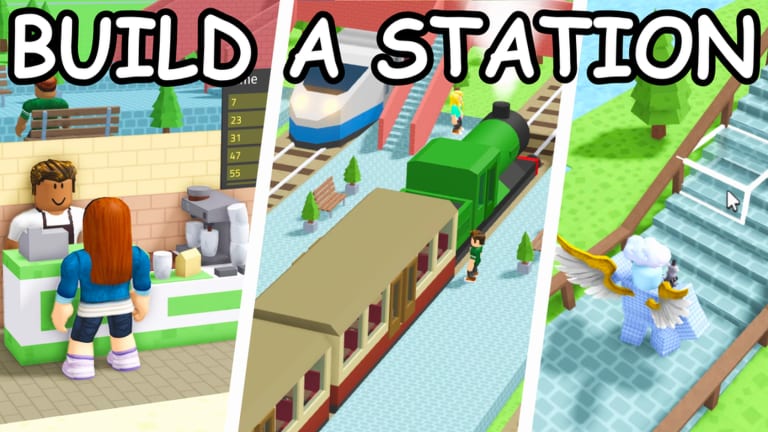
Trains are the payout button in Station Master Tycoon. Guests can love your bakery and still earn you nothing if they never reach a platform aligned with track, or if prefab stairs dump them into a wall. This guide covers the transit layer Taco Dev introduces at the end of the tutorial—after bench, ticket machine, bathroom, bakery, walls, and paving from Getting Started—and how to scale it without breaking Guest Needs and Stars.
Why platforms come last in the tutorial
The built-in tutorial saves platform and track until you understand guest services. That is intentional: a train cannot fix missing bathrooms or ticket machines. Platforms reward stations that already satisfy needs. If you are tempted to build track first for screenshots, finish the service loop or stars will stall while trains look impressive and empty.
Prefab stairs appear just before platforms because many layouts raise boarding areas above ground level. Stairs connect paved concourses to elevated deck without hand-placing every step.
Prefab stairs basics
Prefabs are multi-part placements—stairs, kiosks, structured entrances—placed as one action. For stairs:
- Select the prefabs tool from the build palette (Controls lists inputs).
- Choose a stair prefab that matches your floor height.
- Place the base on paving you laid during the tutorial so guests transition smoothly from bakery corridors.
- Rotate so the top landing opens toward the platform, not a brick wall from Walls, Flooring and Paint.
Bad stair landings create invisible bottlenecks: guests circle the concourse with “ready to travel” thoughts but never find the vertical link. After placing stairs, press E or tap guests at the landing to confirm they path upward.
Platform sizing and placement
A platform is both a waiting area and a boarding edge. Size it for the crowd your amenities generate—not for the train model alone.
- Length — short platforms choke queues when bakery rush sends many guests at once; extend length before adding duplicate shops.
- Width — keep enough space for guests to stack without blocking stair mouths.
- Height — match platform deck to train floor; misaligned height looks fine in build mode but fails boarding logic.
- Clearance — leave headroom if you add roof prefabs later during Rebuild Your Station.
Place platforms after you know where concourse paving flows. Moving track later is easier than moving an entire bakery wing.
Track alignment rules of thumb
Track must meet the platform edge the train stops against. Practical checklist:
- Lay track in a straight approach when possible—sharp cosmetic curves look fun but confuse first-time pathing tests.
- Stop the train flush with the platform segment guests stand on; gaps produce boarding failures or awkward idle trains.
- Avoid threading track through walls; if you must cross structure, widen tunnels so carriages do not clip invisible colliders.
- Test one departure after every track edit: happy guest, cash ping, star tick—if any fail, fix alignment before decorating.
When you Visit Other Stations, watch how veterans align track relative to ticket halls. Good stations hide curves behind scenery but keep the boarding strip simple.
Vertical stations
Raised platforms are common in player builds. Workflow:
- Pave ground concourse (flooring tool).
- Drag retaining walls if you want visible elevation change.
- Place prefab stairs at two points if traffic is heavy—one stair often bottlenecks during star grinds.
- Build platform deck at upper elevation.
- Connect track at matching height.
Eyedropper and paint can color upper and lower zones differently so guests intuit which level leads to trains versus food.
Expanding for multiplayer visits
Servers host up to four players. Trains also carry you to other stations. A platform that handles your solo traffic may fail when friends route extra guests through your layout during visits. Leave expansion bays—extra platform tiles and track stubs—for future cars.
Visiting is not just tourism; it stress-tests boarding throughput. Note where foreign guests pile up and fix stairs or width when you return home.
Common platform mistakes
Track before services — stars stall; see Guest Needs and Stars.
Stairs facing walls — rotate prefabs until landings open to paved paths.
Single narrow stair for whole concourse — split vertical access before extending track length.
Decor clipping track — props through rails block trains silently; test departures after prop spam.
Platform at wrong elevation — rebuild deck height instead of forcing guests to hop visually.
Integration with other guides
Structure tools live in Walls, Flooring and Paint. Remodel without deleting stairs blindly in Rebuild Your Station. Input reference in Controls. Hub navigation in Guides Hub.
Platforms and prefabs turn a functioning service station into a tycoon. Get amenities right first, then treat every track segment as a happiness delivery line—not a photo prop.
Frequently Asked Questions
Quick answers for Station Master Tycoon players.
When should I build the platform in Station Master Tycoon?
Follow the tutorial: after bench, ticket machine, bathroom, bakery, walls, paving, and prefab stairs. Platforms pay best when guest needs are already solved.
Why are prefab stairs important?
Many platforms sit above the concourse. Stairs connect paved foot traffic to the boarding deck without manual step placement.
How do I know track aligns with my platform?
Run a test departure after laying track. Happy guests should board cleanly and trigger cash when the train leaves.
Can I move track later?
Yes, but rebuild stairs and platform edges together so vertical access and stop points still match.