Station Master Tycoon Station Planning Tools
Printable-style checklists you can follow while building — no downloads, no exploits.
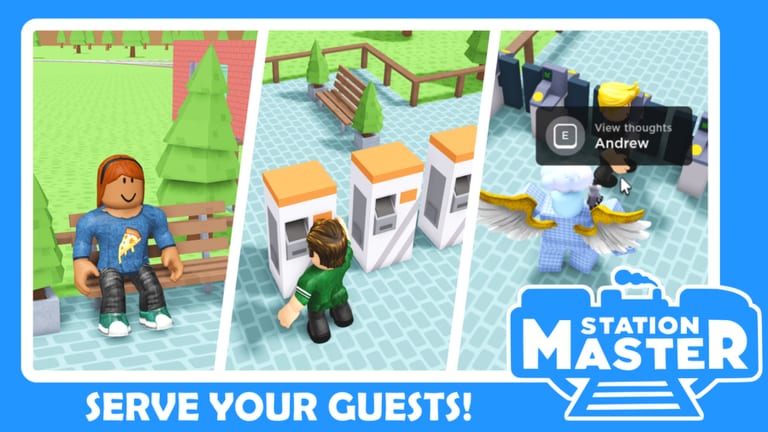
Building in Station Master Tycoon is easier when you treat the station like a flow problem, not only a decoration project. Taco Dev’s sandbox drops you into an open-world map where AI guests sit, shop, eat, and eventually board trains — but only if platforms, amenities, and walking paths make sense first.
This Tools Hub collects interactive checklist pages you can keep open on a second monitor, phone, or tablet while you play. They are plain markdown checklists — not executors, not auto-farm scripts, and not fake “hacks.” Every item maps to legitimate in-game actions you already have through the build menu, guest thought bubbles, and star ratings.
Why checklists beat unverified scripts
Players often search for scripts when progress feels slow. In our Scripts Hub we explain that no verified public scripts exist for this game today — and that third-party tools mostly risk account bans or malware. Checklists solve the real bottlenecks:
- Missing amenities guests mention when you press E (or tap prompts on mobile).
- Confusing layouts that look beautiful but frustrate foot traffic.
- Star unlocks gating better benches, shops, and departure boards in the build catalog.
Working through a checklist keeps your station aligned with how Taco Dev designed progression — happy guests leaving on trains — without violating Roblox Terms of Use.
Tools available on this wiki
Guest Needs Checklist
Use this before and after every expansion wave. It mirrors the tutorial’s core chain — seating, ticketing, hygiene, food, structure, paving, vertical access, platforms, and track — plus ongoing guest thoughts about shops, stars, and comfort. Tick items mentally (or copy the list into notes) as you verify each need in-game.
Best for: new players finishing the first hour, veterans debugging why stars stalled, and anyone returning after a patch.
Station Layout Planner
Use this when you are sketching a new wing, rebuilding after a style change, or copying ideas from stations you visit by train. Sections cover entry flow, platform spacing, shop placement, signage sightlines, and test walks from spawn to boarding.
Best for: players who over-decorate early, multi-platform hubs, and servers with friends building adjacent concourses.
Gamepass Picker
Use this when you are about to spend Robux on Plot Expansion, Extra Height, Extra Platforms, Classic Pack, Funky Flooring, or Bullet Train (~200 Robux). Goal-based checkboxes map passes to horizontal space, vertical builds, platform count, cosmetics, or premium trains — with links to Gamepasses Guide and Gamepasses Tier List for deeper comparisons.
Best for: free forever players who want one deliberate purchase, parents approving Robux, and builders returning after Recent Patches.
More tools may appear here as the game adds mechanics (events, new shop tiers, seasonal props). Each will stay checklist-first — actionable in Roblox, not dependent on external code.
How to use these tools in a session
- Load Station Master Tycoon on Roblox on your preferred device.
- Open the checklist page you need in a browser tab.
- Play in windowed mode or split-screen if possible so guest thoughts stay visible alongside the list.
- After major builds, ride the train loop and visit another player’s station — note one layout idea to try, not a script file to download.
- Cross-check Active Codes when Taco Dev drops promo rewards; none may be live, but redemption still beats exploit searches.
Pair tools with guides and links
Checklists answer “did I forget something?” Guides answer “why does this matter?”
- Getting Started — narrative walkthrough of the first stations.
- Guides Hub — deeper topics as we publish them.
- Script Safety Guide — if you were tempted to search for exploits instead.
- Official Links — game page, Taco Dev group, Discord, and Naco88 YouTube for patch-aware tips.
Design philosophy
Station Master Tycoon rewards observation. You watch guests use what you built. Our tools therefore emphasize verification loops: build a zone, read guest feedback, adjust paths, then decorate. Skipping the loop produces screenshots that look good in thumbnails but feel dead in live servers.
We also avoid turning tools into generic tycoon calculators this game does not need. You will not find fake “profit per second” formulas here — guest satisfaction and stars drive unlocks, not spreadsheet fantasy numbers.
Contributing feedback
If a checklist item no longer matches Taco Dev’s latest tutorial after an update, compare notes on the Discord community and watch the Updates Hub for patch summaries. Wiki tools should reflect live behavior, not outdated clickbait.
Quick links
- Guest Needs Checklist — amenity and star progression ticks
- Station Layout Planner — paths, platforms, and shop zones
- Gamepass Picker — match Robux spends to build goals
- Scripts Hub — honest status on exploits (currently none verified)
- Codes Hub — promo redemption when codes return
Open a checklist, join a server, and build stations guests actually use — that is the real Station Master shortcut.
Frequently Asked Questions
Quick answers for Station Master Tycoon players.
Do these tools require downloads?
No. They are markdown checklists on this wiki. Read them in your browser while playing Roblox — nothing installs on your PC or phone.
Which tool should I use first?
New players should start with the Guest Needs Checklist after skimming Getting Started. Use the Layout Planner when you add a second platform or major concourse wing.
Can I use these on mobile?
Yes. Open the checklist in mobile Safari or Chrome alongside the Roblox app. Switch apps to tick items as you confirm them in-game.
Are these tools official?
This is a fan wiki, not Taco Dev. The steps mirror public gameplay and community-verified flows, but always trust in-game prompts after major patches.
Why not script tools instead?
We found no verified public scripts for Station Master Tycoon and will not host exploit code. Checklists give safer, repeatable progress.